Daily meetings should be a safe place for collaboration, not a performance review. The goal is not to “report to managers” but to work together as a team to keep flow healthy and finish what was started. Over time, many stand-ups lost their focus and shifted from “getting things done” to“ensuring people are working”. To bring back focus, let’s ask ourselves a simple question:
Are we finishing what we started?
If the answer is no, there are usually a few reasons:
- The team’s context has shifted (new priorities, unexpected requests).
- The team is facing technical difficulties or blockers.
- Work is stuck in queues or waiting for input from others.
When this happens, you have a few options:
- Cut scope → reduce the size of the work item to make it deliverable.
- Change the strategy → adjust approach, pair program, or redistribute workload.
- Drop the task → cut losses if the item no longer delivers value.
Remember: product development is about making bets. The earlier you spot when a bet isn’t working, the cheaper it is to change course.
Common Problems Aging Metrics Help Solve
- Teams start new work faster than they finish old work.
- Too many items are worked on at the same time.
- Work items get stuck in queues, waiting in stages without progress.
- Developers are pulled in multiple directions, preventing focus.
- Silent blockers: developers often don’t speak up when struggling with a task or implementation.
At this point, Aging Issues andAging Branches act as an early warning system:
- When an issue or branch turns yellow, it’s often a sign that there might be an unspoken obstacle.
- This allows the team to step in before it becomes a bigger problem, by offering support, revisiting priorities, or reallocating resources.
How to Make Stand-ups Work with DevStats
Example: Healthy Aging Issues Cycle
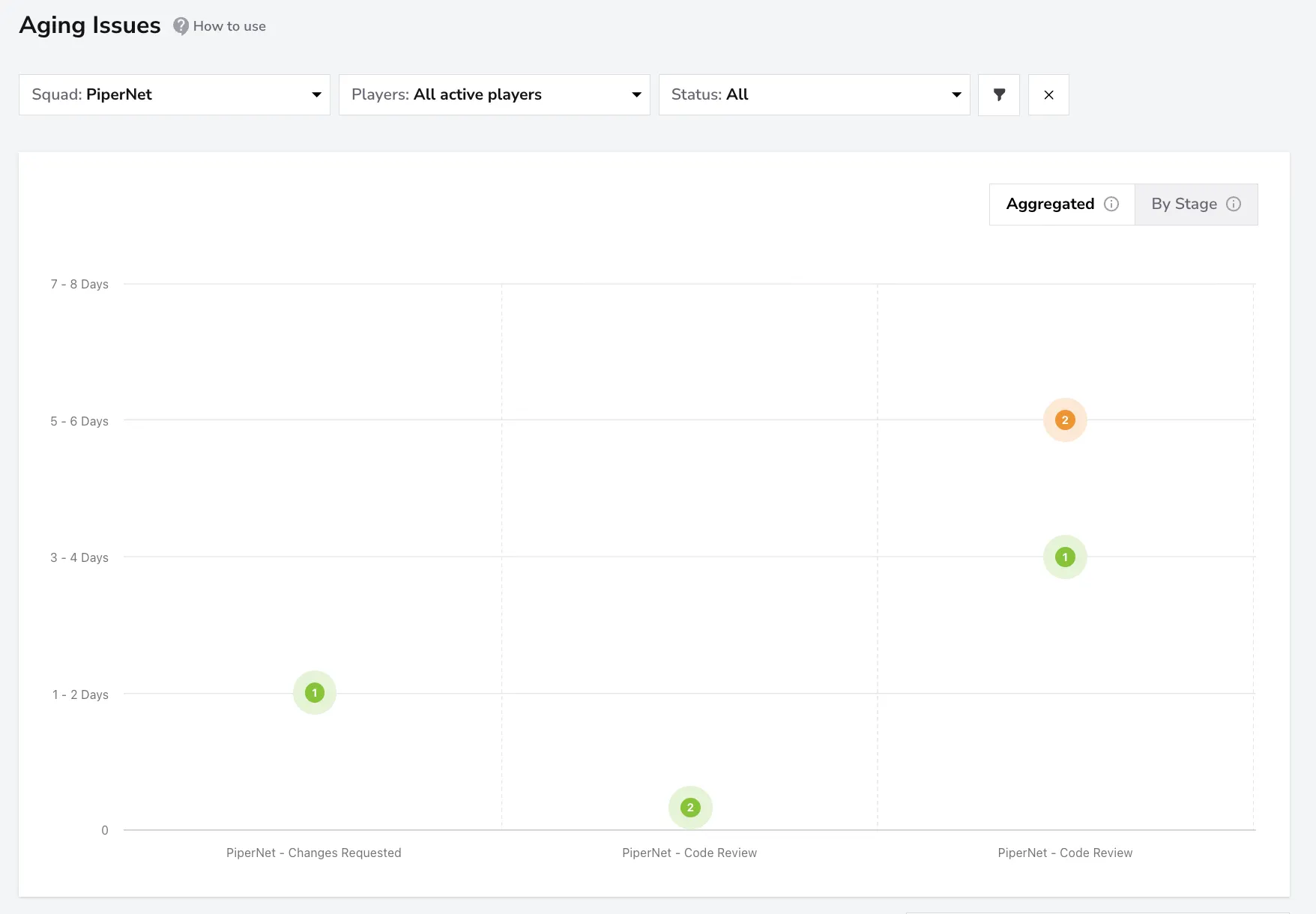
Here we are looking at our demo’s Aging Issues report for the PiperNet squad, using the Aggregated view — meaning the time shown here represents the total across all stages up to the current one.
- This squad doesn’t have any issues in the red stage, which is a great sign of flow health.
- Most tasks are green, meaning they are progressing within healthy limits.
- There’s only one task in yellow, sitting in Code Review for a bit longer than expected.
This is overall a very healthy cycle, but the yellow task might just need a small push—a reminder to reviewers or a quick pairing session—to finally get it done.
To dig deeper, you can switch from the Aggregated view to the Stage view. This lets you see exactly how long a task has been aging in its current stage, so you can surface it directly in the daily meeting or reach out to the person responsible to check if any support is needed.
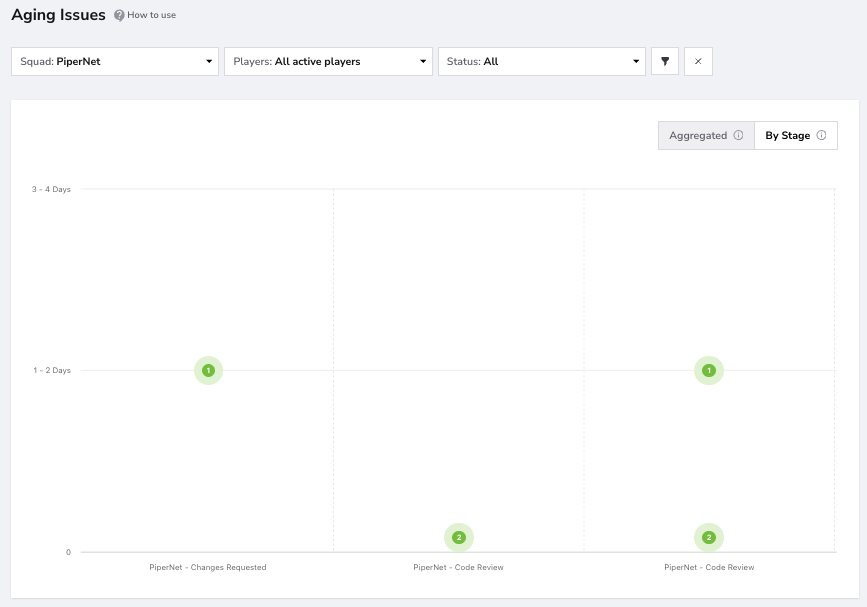
By catching it now, the team can prevent this item from turning red and avoid a larger delay later.
Quick Approach By Color
Dive Deeper
Want to learn more about how aging metrics work in detail? Check out the dedicated pages:

Summary
Daily meetings are about finishing what was started, not just reporting progress. Aging Issues and Aging Branches act as early warning systems, helping teams spot delays, unblock work, and keep flow healthy. By focusing on aging signals, teams can collaborate better, reduce silent blockers, and deliver more consistently. For best results, keep these reports open during your daily meetings!