High-performing teams know that fast, consistent code reviews directly impact delivery speed and product quality. When pull requests wait too long for review or merge, development slows, context fades, and the team’s feedback loop breaks. In DevStats, you can visualize how review practices affect your Pull Request Cycle Time and identify where work gets stuck, helping teams speed up collaboration without sacrificing quality.
Why Review Speed Matters
A delayed review doesn’t just slow down one PR. It blocks deployment, increases merge conflicts, and reduces developer focus. Improving review responsiveness leads to:
- Shorter Cycle Time and faster feedback loops
- Reduced rework and context switching
- More stable delivery flow across teams
Check the Current Situation
Open the PR Cycle Time Dashboard to visualize average and percentile values for Review Time and Pickup Time. Use the Scatter visualization to spot outliers, such as PRs that stayed in review much longer than the rest.
To understand current review performance:
- Filter by Squad or Assignee(s)
- Compare trends over time to see if delays are systemic or recent
- Check the Aging Branches Report to find open branches currently stuck in the Review stage
- Review the Code Review Dashboard to monitor PR Size, since large pull requests tend to delay review completion
If your review phase consistently contributes most to total Cycle Time, it’s a clear sign of a feedback bottleneck.
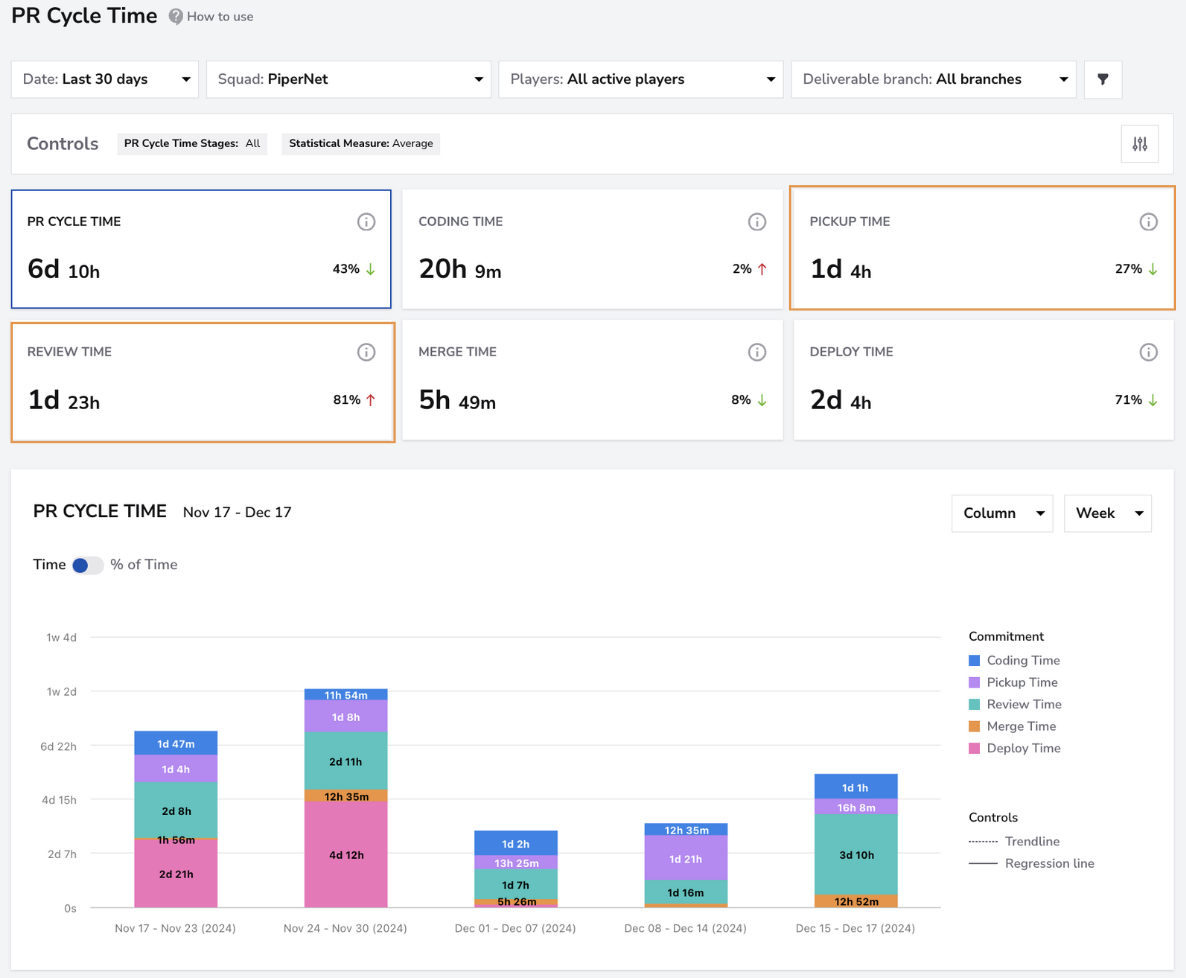
The PiperNet squad uses the PR Cycle Time Dashboard to identify review bottlenecks. The charts reveal that Review Time is the main contributor to total cycle time, helping the team focus improvement efforts where delays occur most.
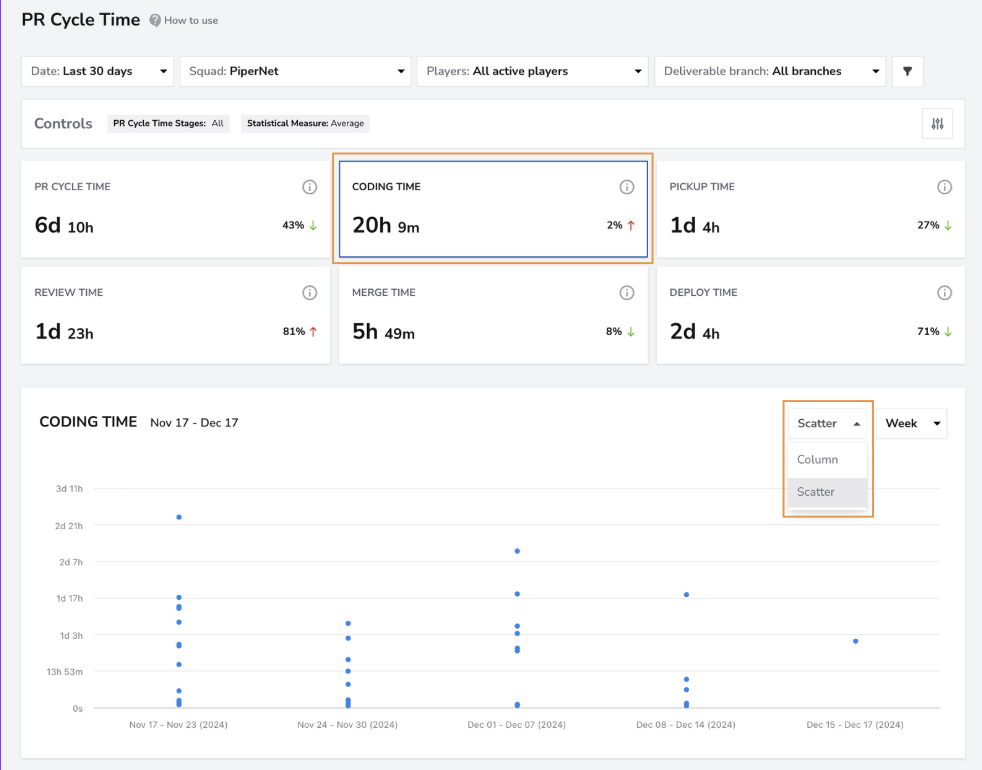
After selecting the Review Time card, the Scatter view displays each pull request’s review duration as a data point, helping teams quickly spot outliers that took significantly longer to review. Discussing what caused these outliers, such as PR size, ownership, or reviewer availability, helps teams uncover patterns and drive meaningful process improvements.
Focus on Code Review as a System
Most delivery slowdowns stem from review delays, making Review Time one of the best predictors of overall performance. In DevStats, improvements to review efficiency often reduce total Cycle Time within a few sprints.
To get started:
- Use Benchmarks in the Snapshot section to compare your Review Time with industry standards
- Track weekly changes in Review Time on the PR Cycle Time report and PR Size on the Code Review Dashboard- Use the Aging Branches Report to spot open PRs in the Review stage before they become stale
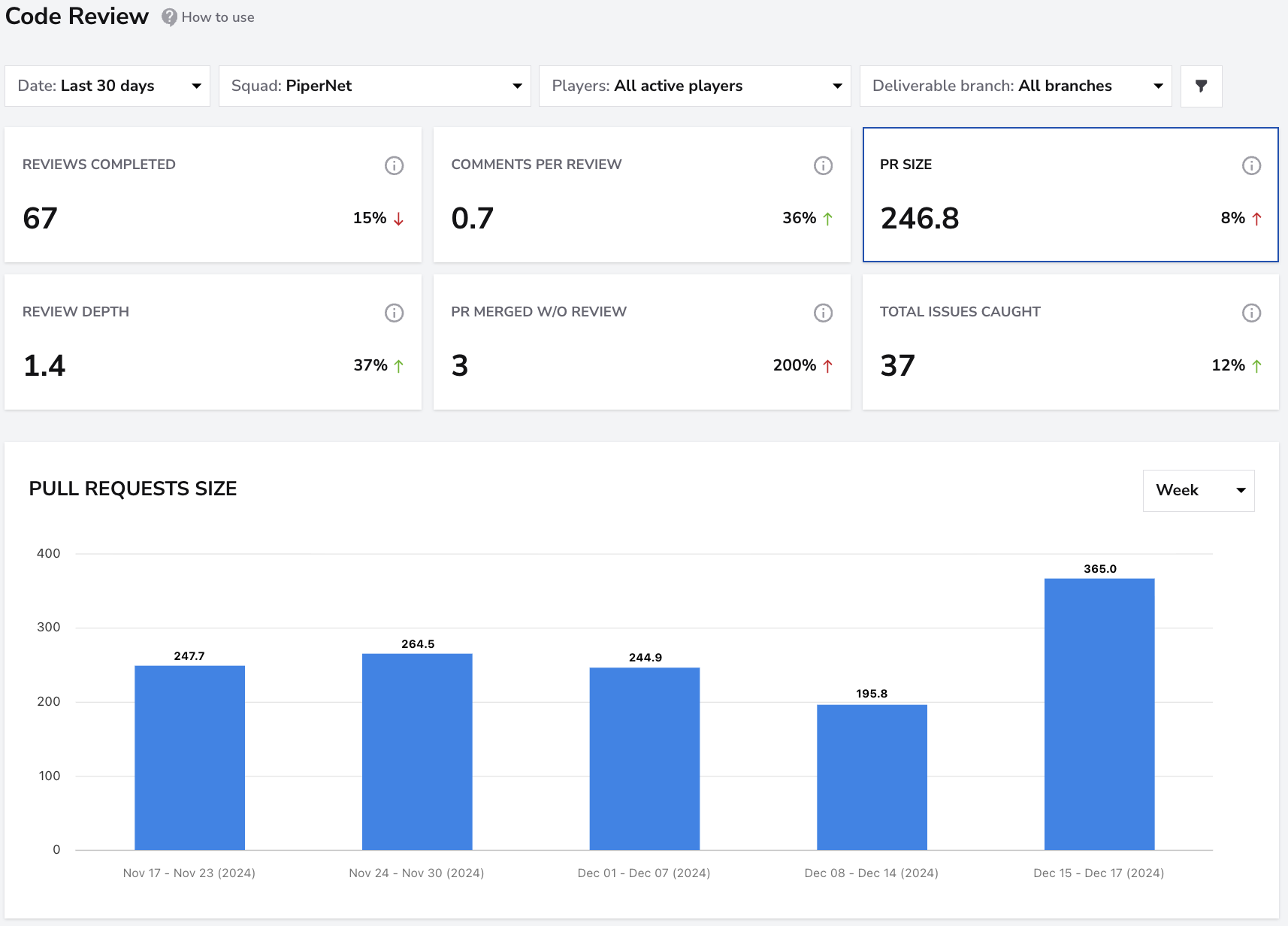
Pro Tip: Encourage small, focused pull requests. Smaller PRs are easier to review, less risky to merge, and move faster through the pipeline.
Investigate Throughput and Trends
Explore the Flow section in DevStats to analyze review time distribution and throughput trends across multiple reports, including PR Cycle Time, Throughput, and Aging Branches. Median review times are often healthy, but high variance or spikes in the 85th percentile indicate inconsistent review behavior.
Ask:
- Are reviewers overloaded or unevenly distributed?
- Are PRs too large or cross-team by nature?
- Are reviews getting stuck waiting for approvals?
The Aging Branches view is especially helpful for identifying where work is getting stuck. It shows open branches by stage, such as Coding, Review, or Merge, allowing teams to spot patterns and prioritize delayed pull requests before they become bottlenecks.
These insights help define team-specific improvement targets, such as “review within 24 hours” or “merge within 2 days.”
Build a Feedback Loop
Integrate code review analysis into your retrospectives:
- Identify PRs that took longest to review (Scatter view helps here)
- Discuss what caused the delay, such as unclear ownership, lack of reviewers, or PR size.
- Track progress over time and celebrate improvements in Review Time
You can also monitor Review Time as part of your DORA metrics to see how review efficiency improves your PR Cycle Time.
Next Steps
Once review speed becomes consistent, explore Cycle Time reduction holistically:
- Limit work in progress to reduce reviewer overload
- Automate review assignments or reminders
- Set internal review SLAs and track them directly in DevStats
- Compare Cycle Time and Deployment Frequency to assess how review improvements accelerate delivery
Continuous attention to review flow doesn’t just make engineers faster — it makes the entire development process more predictable and scalable.