To ensure an accurate overview of all tasks, it's essential to categorize them correctly into the appropriate categories. In the Balance model, the following issue types are examples you can map to each category.
- New Things:
Feature - Improve Things:
Enhancement - Keep The Lights On (KTLO):
BugHotfixQA - Productivity:
ChoreTechnical Debt
Choose a model
As an owner or administrator, open Settings → Engineering Investment. Select Balance in the grid to configure its four categories or New model to create a custom model.
For custom models, enter a model name and define the name, color, and issue types of each category. After saving, you can use Set as default, Duplicate, and Delete model.
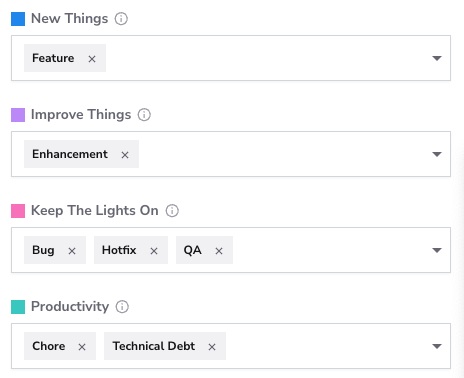
Step 1: Categorize Issue Types
- How: If you receive a warning about uncategorized issue types, click a category's dropdown to view the available issue types and select those that belong to it. Each issue type can belong to only one category. Click Save Settings to save.
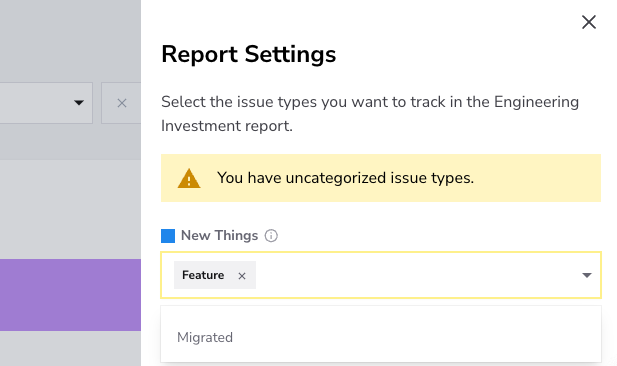
Once all labels have been categorized, the warning message will disappear.
Custom models use issue-type mappings only. AI Agent classification remains available only in Balance.
Category Reference
The Category Reference below lists common classification examples for the Balance model. You can use these mappings as a starting point when configuring your own issue types.
| Category | Example Issue Types |
|---|---|
| New Things | Feature, New Feature, Epic, Story, Task, New Functionality, New Service, Integration |
| Improve Things | Enhancement, Refactor, Improvement, Optimization, UI/UX Update |
| Keep the Lights On | Bug, Maintenance, Hotfix, Support, QA, Security Patch |
| Productivity | Chore, Technical Debt, Automation, Internal Tooling, Infra Improvement |