The Allocation Dashboard helps teams manage different types of work to ensure that planned tasks, maintenance, and unplanned opportunities are balanced. This flow guides you through how to effectively use the dashboard to keep your team aligned with strategic goals and avoid bottlenecks caused by an overload of unplanned tasks or maintenance.
Step 1: Analyze the Distribution for Different Time Frames
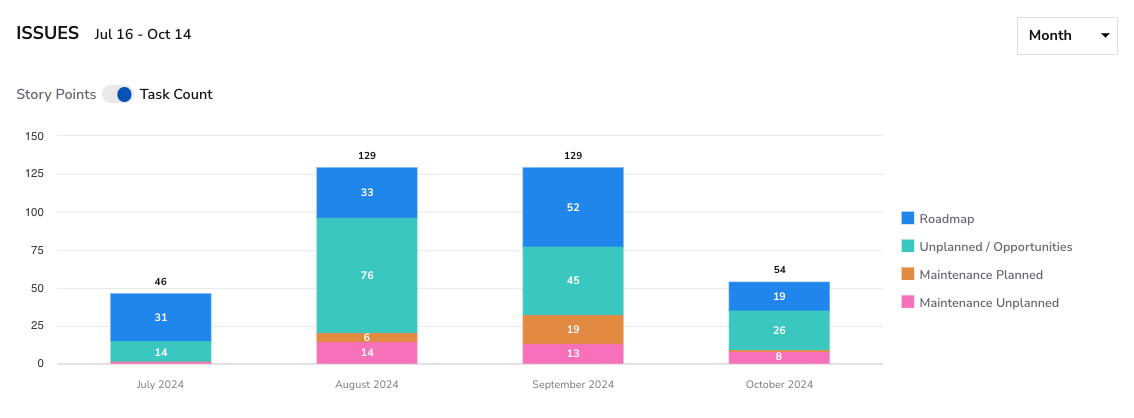
- How: Review the allocation for different time ranges like 30, 60, or 90 days.
- What to look for:Check if your team dedicates enough time to Roadmap Work(planned strategic tasks). An overbalance of Unplanned Work or Unplanned Maintenance could indicate the team is spending too much time on unexpected tasks, pulling focus away from long-term objectives.
Step 2: Use Filters to Narrow Down Issues
- How:Apply the Squad or Players Filter to focus on specific teams or individuals. This will help you identify which teams are handling more unplanned work or maintenance than others.
- What to look for:Identify if any team or individual is consistently overwhelmed by Unplanned Work or Maintenance. This could point to issues such as poor planning, technical debt, or inefficient processes that need attention.
Step 3: Adjust and Monitor
Once you’ve identified any imbalance, adjust sprint planning to rebalance the workload. For example, if unplanned maintenance is high, allocate more resources to Planned Maintenance to reduce future unplanned tasks, or shift focus toward Roadmap Work to meet strategic goals.
Finally, the allocation should be regularly reviewed to see if the balance between planned work and unplanned work improves.
Conclusion
- Monitor Work Balance: Regularly review the dashboard to ensure an appropriate distribution of the four types of work. This helps prevent overcommitment to any one category, which can negatively impact productivity and goal alignment.
- Identify Trends and Bottlenecks: Use the visual representation of work allocation to detect trends or bottlenecks, such as an increase in unplanned work, which could indicate deeper process issues or shifting priorities.
- Improve Planning and Resource Allocation: Leverage the data from the dashboard to plan more effectively for future sprints. By understanding how much time is typically devoted to each type of work, teams can make data-driven decisions to adjust priorities, allocate resources, and manage capacity.