What is the Planning Accuracy Feature?
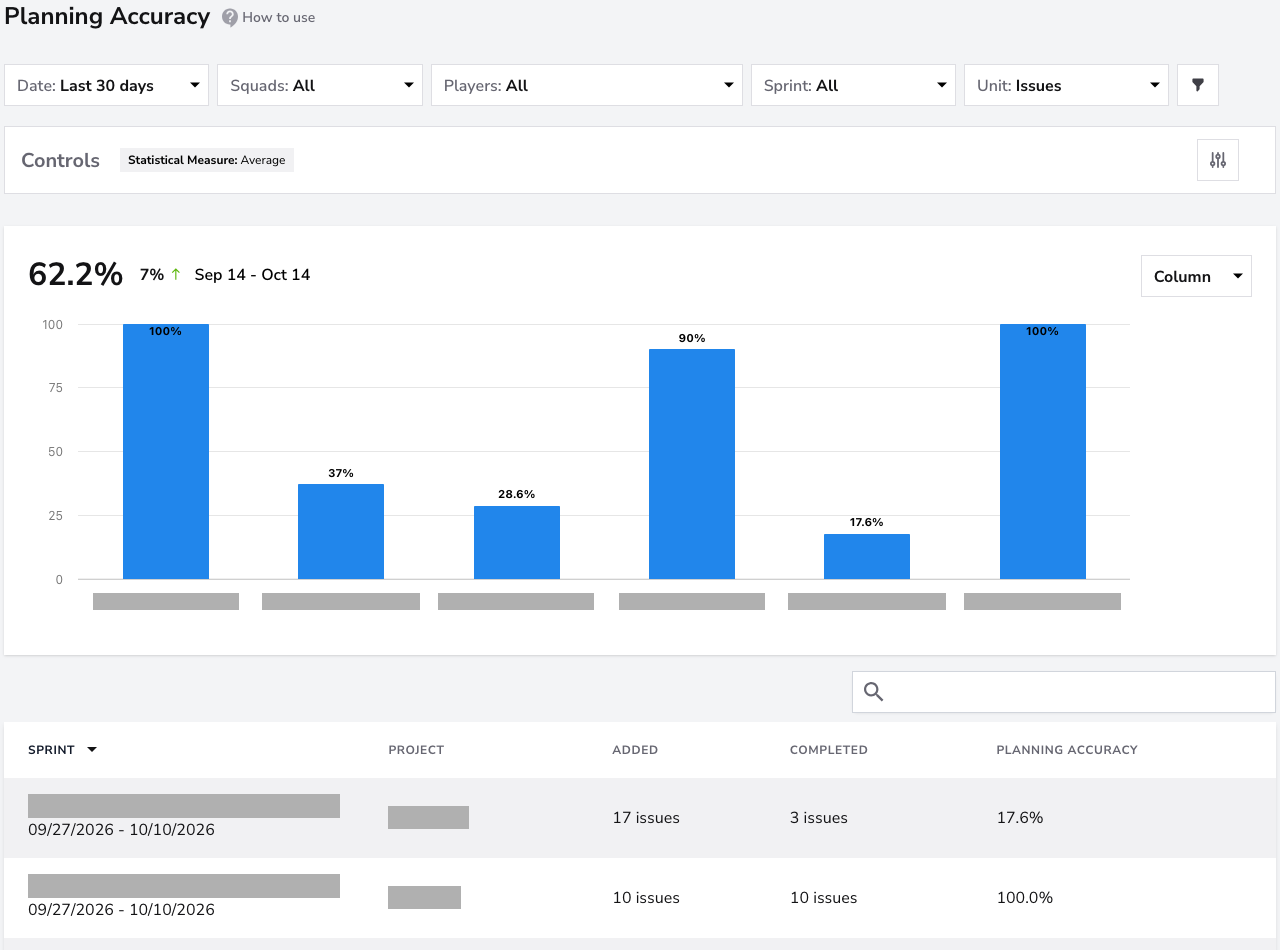
The Planning Accuracy feature provides a straightforward way to monitor how much of your team’s work was successfully completed in a sprint. Unlike the more detailed Sprint metrics, this dashboard simplifies tracking by focusing on one key metric: the percentage of sprint work completed, including work added after the sprint started. This is crucial for ensuring your team isn’t overcommitting to tasks and can realistically deliver on sprint commitments.
Note: This feature is exclusive to Scrum projects. Teams operating under a Kanban workflow will not have data available in this report, since Planning Accuracy depends on sprint-based planning and completion cycles.
Metrics
- Planned Work Completed (%): Despite the name, this key metric reflects the percentage of tasks or story points in the sprint that was successfully completed by the end of it, including those added after it started.
Removed items remain in the total while they are still associated with the sprint in the synced data. Items carried over to another sprint without completion in the original count as incomplete in the original sprint.
Filter
Drill down into individual squads to view their planning accuracy. This filter is particularly useful for identifying which squads are consistently meeting their sprint commitments and which may require adjustments to their planning or workload distribution.

Focus on a specific time range to analyze planning accuracy for recent or past sprints. Select pre-defined periods like the last 30, 60, or 90 days, or customize the date range to suit your needs.

Focus the report on specific team members. This filter enables managers to analyze individual players' contributions and planning accuracy within a sprint, helping to identify areas for support or improvement.

Select specific sprint cycles to view detailed planning accuracy metrics for each sprint. This filter is ideal for tracking performance over multiple sprints or analyzing a single sprint cycle in detail.

Choose between Issues or Story Points to tailor the metrics displayed.
- Issues: Counts the total number of issues allocated to each sprint.
- Story Points: Reflects the total number of story points committed to a sprint, providing a more nuanced view of workload.

Controls
In this report, Controls offers Chart Settings only: enable Trendline or Regression line to inspect whether accuracy is improving sprint over sprint. Planning Accuracy is always the average of the sprints in the period, so Statistical Measure is not available. PR Cycle Time Stages is not available either.
Click the adjustments button on the Controls bar and select Save after choosing your options. See the Controls guide for details.
Conclusion
The Planning Accuracy feature is essential for ensuring that your team’s sprint commitments align with their capacity. By consistently monitoring this metric, teams can avoid overcommitting, improve predictability, and maintain a sustainable workflow.