PR Rollback mode automatically detects incidents from Revert PRs merged into the deploy branch, with no branch prefix configuration or manual registration required.
Where to Find It
Go to Settings in DevStats. Under Reports Configuration, click Incidents. With the Data Source set to Git Provider, select PR Rollback as the Detection Method and click Save Settings.
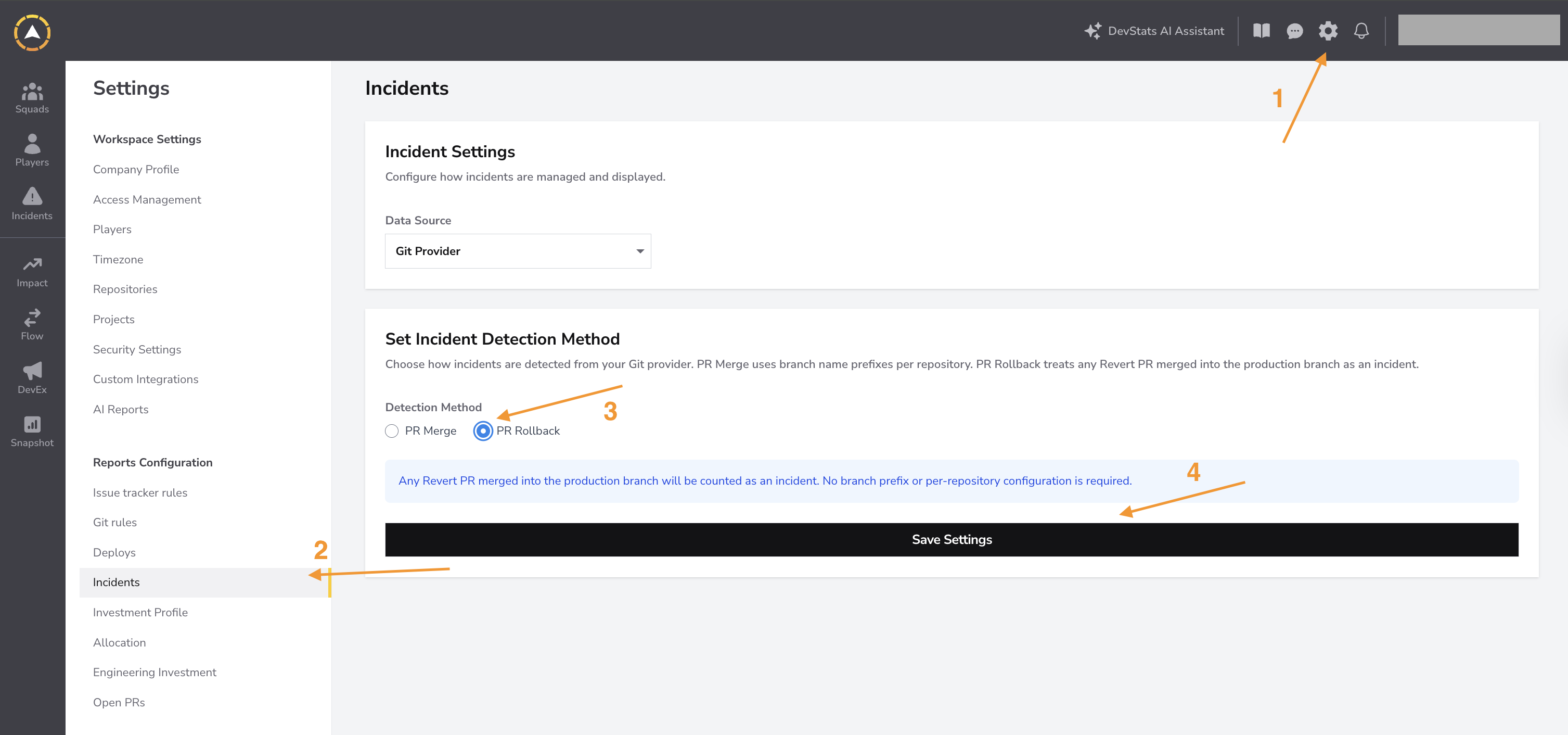
When PR Rollback is selected, the branch prefix table is hidden and replaced by an informational message. The setting applies to the entire workspace with no per-repository configuration.
PR Rollback vs PR Merge
| PR Merge | PR Rollback | |
|---|---|---|
| What counts as a failure | PRs with issue type Hotfix, Bug, or both (configurable per repository) | Revert PRs merged into the deploy branch |
| Configuration scope | Branch prefix per repository | Entire workspace, no branch prefix |
| Issue type filter | Applied (Hotfix, Bug, or both) | Ignored entirely |
Change Failure Rate (CFR)
With PR Rollback enabled:
- Numerator: number of Revert PRs deployed (merged into the deploy branch) in the period
- Denominator: total deploys in the period
CFR = (Revert PRs / Total Deploys) × 100
The issue type filter (Hotfix / Bug) is completely ignored in this mode.
Mean Time to Recovery (MTTR)
For each Revert PR deployed in the period:
| Description | |
|---|---|
| Incident start | pr_merged_at of the original PR that was reverted (when the link to the original PR is available) |
| Incident start (fallback) | pr_created_at of the Revert PR (when the original PR cannot be identified) |
| Incident resolution | pr_merged_at of the Revert PR |
MTTR = average(resolved − start) across all Revert PRs in the period
Detection by Provider
GitHub
- Detection: title starts with
Revert - Link to original PR: extracted from the source branch name. GitHub's native "Revert" button creates branches following the pattern
revert-<N>-<original-branch-name>, where N is the original PR number. - Reliability: high.
GitLab
- Detection: title starts with
Revert - Link to original MR: extracted from the MR description. GitLab's native "Revert" button always adds the text
This reverts merge request !Nto the description. - Reliability: high.
Azure Repos
- Detection: title starts with
Revert - Link to original PR: best-effort. DevStats parses the title following the pattern
Revert "<original PR title>"and searches for a PR with that exact title in the same repository. - Note: Azure Repos has no native "Revert PR" button. If the original PR cannot be found, MTTR uses the
pr_created_atof the Revert PR as a fallback.
Bitbucket
- Detection: title starts with
Revert - Link to original PR: best-effort. DevStats parses the PR description for a reference to the original PR number.
- Note: the link is not guaranteed. If the original PR cannot be identified from the description, MTTR uses the
pr_created_atof the Revert PR as a fallback.