What is the Code Review Feature?
The Code Review dashboard provides a comprehensive view of your team’s code review process, helping you maintain high code quality and improve review efficiency. Through metrics such as reviews completed, comments per review, review depth, and PR size, this dashboard reveals the level of engagement and thoroughness in your reviews.
By tracking these indicators, teams can identify areas for improvement, foster a positive review culture, and ensure consistent, meaningful feedback that strengthens code quality and collaboration.
Metrics
The dashboard presents several key metrics to help you evaluate and enhance your code review process:
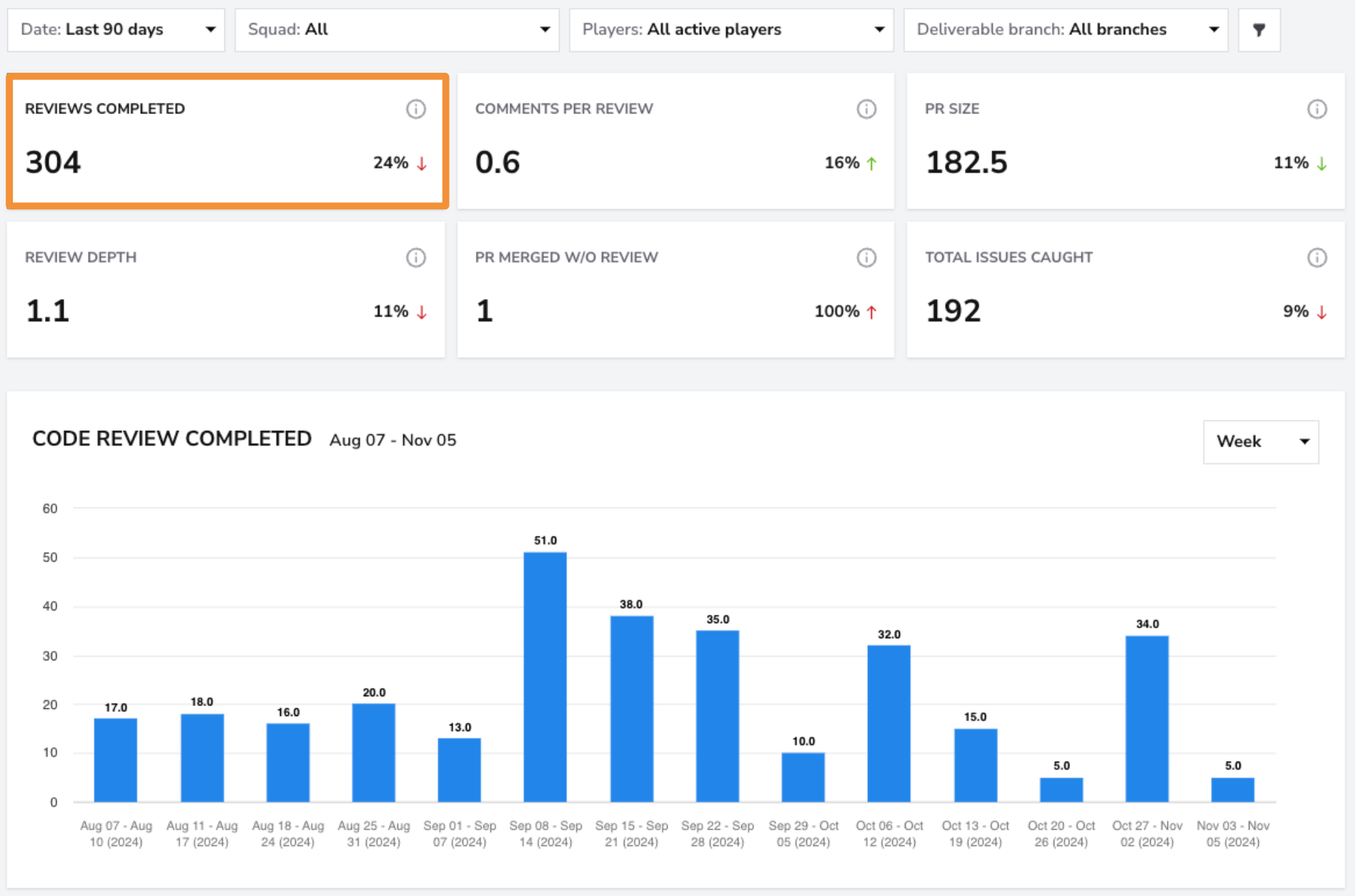
Reviews Completed
- What: The total number of code reviews completed on pull requests merged within the selected period. Each individual review counts separately. If multiple reviewers participate in the same pull request, each of their reviews is included in the total.
- Why it matters: This metric reflects the team’s level of engagement in code reviews, which is essential for maintaining code quality and ensuring consistency across contributions.
- How to use it: Monitor review volume over time to assess whether the team is maintaining a steady review pace or if reviews are being deprioritized during certain periods. A healthy cadence indicates consistent collaboration and shared ownership of code quality.
- User interface:
Comments per Review
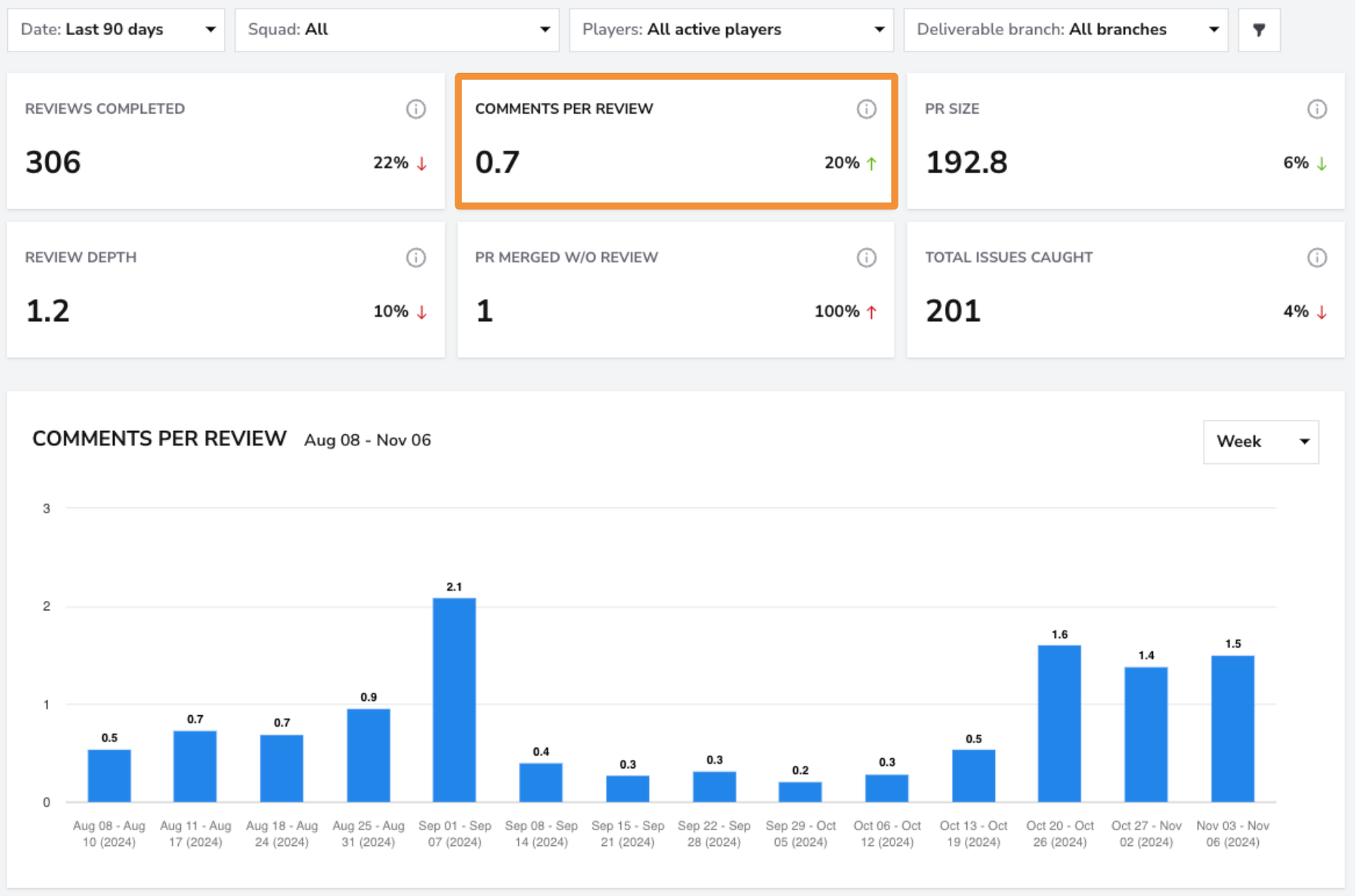
- What: The average number of inline comments left per review, representing how much feedback is provided directly on code lines. (e.g., 1.2 comments per review).
- Why it matters: Higher comments per review suggest more thorough reviews, while lower numbers may indicate a need to encourage deeper feedback.
- How to use it: Encourage meaningful comments to improve code quality and promote knowledge sharing. Use this metric to track review depth and identify areas where feedback could be more comprehensive.
- User interface:
PR Size
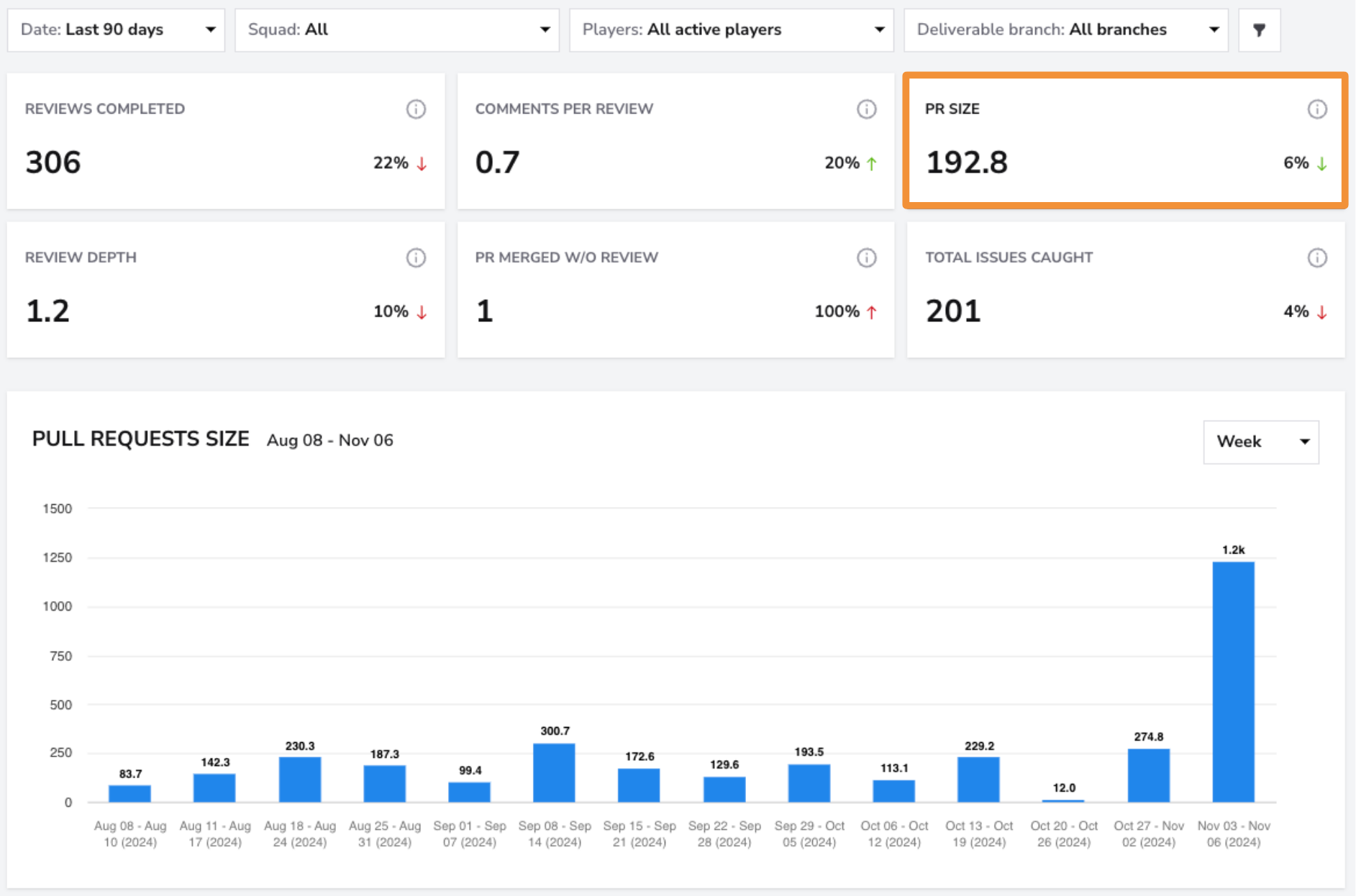
- What: The average size of pull requests merged within the selected period, measured in lines of code.
- Why it matters: Smaller PRs are generally quicker to review and less prone to errors, while larger PRs can slow down the process and increase review complexity.
- How to use it: Encourage contributors to break down larger changes into smaller PRs for faster reviews. Track PR size over time to promote manageable, high-quality reviews.
- User interface:
Review Depth
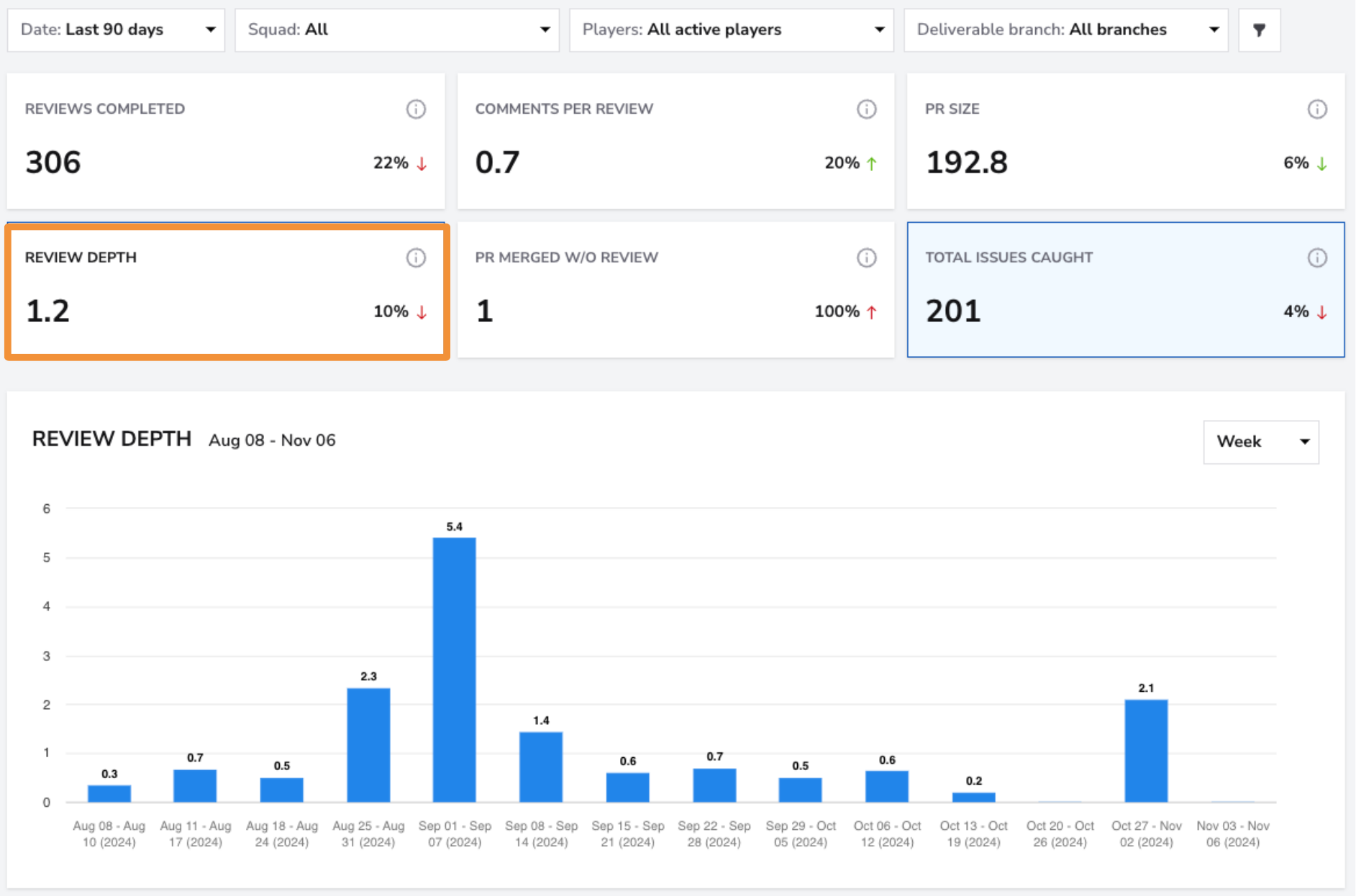
- What: The average number of inline comments per pull request.
(This includes inline code comments, not comments on the PR discussion.)
- Why it matters: This metric reflects the thoroughness and quality of code reviews. A higher number of comments may indicate deeper collaboration and feedback, while very few comments could suggest limited engagement or overly simple PRs.
- How to use it: Track changes in review depth over time to understand your team’s review culture. Aim for a balance, with enough comments to ensure thoughtful review and shared understanding, but not so many that they slow down delivery.
- User interface:
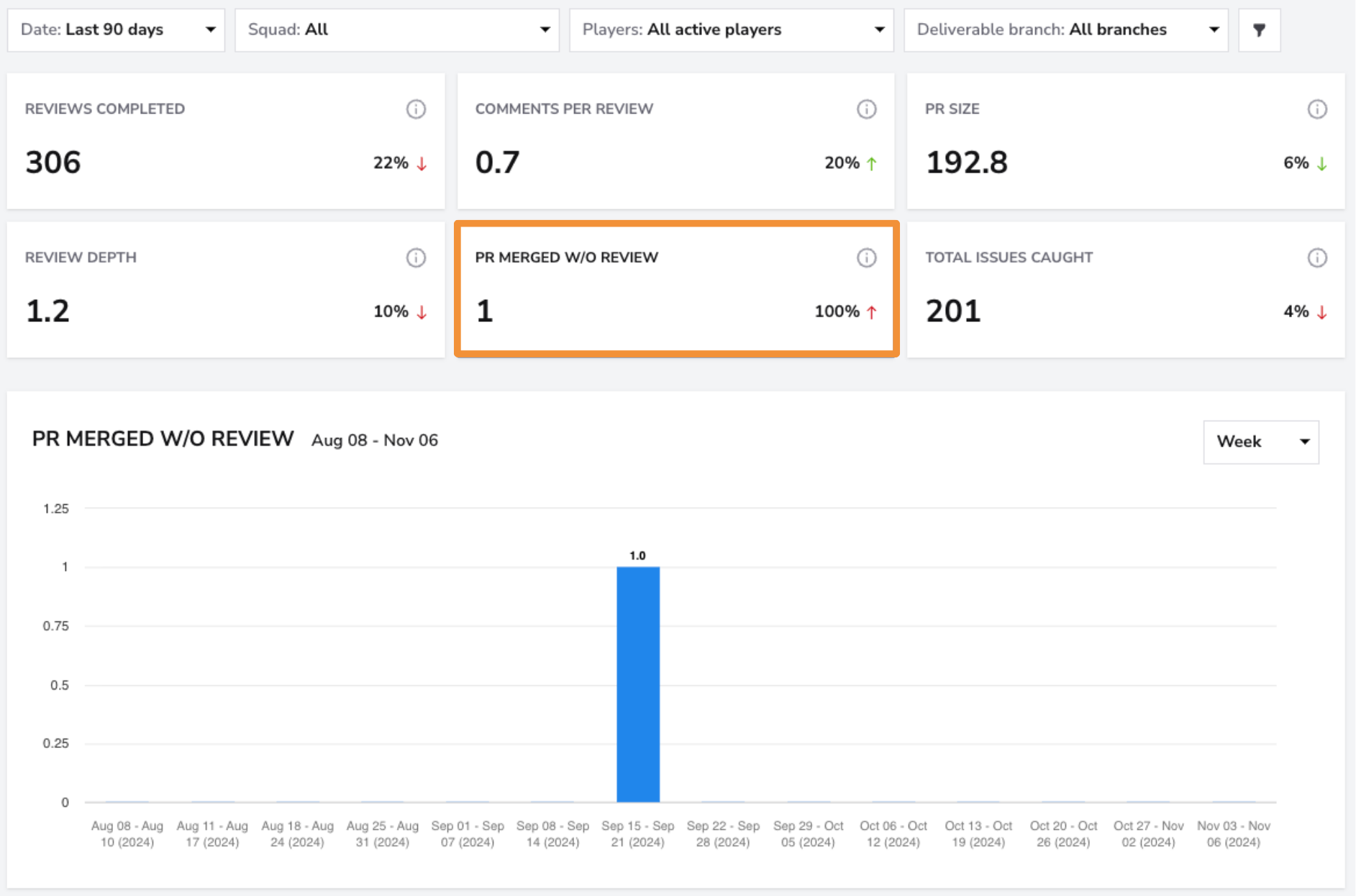
PRs Merged Without Review
- What: The number of merged pull requests with no recorded reviews.
- Why it matters: Unreviewed PRs can introduce quality risks, reduce accountability, and bypass collaboration practices. Monitoring this metric helps teams ensure that every code change is properly reviewed before reaching production.
- How to use it: Keep this number as close to zero as possible. A high count of unreviewed PRs may indicate time pressure, gaps in the review process, or missing reviewer assignments. Use this insight to reinforce review policies and maintain codebase integrity.
- User interface:
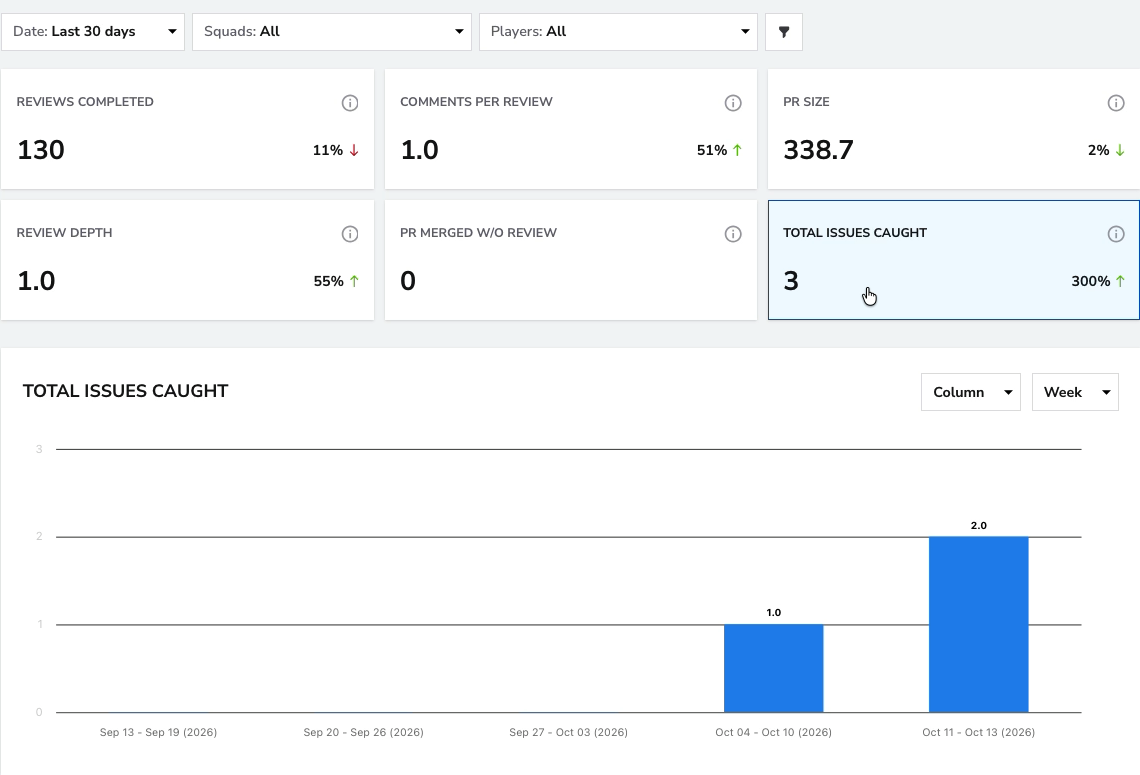
Total Issues Caught
- What: The total number of inline comments associated with commits to the same file.
A comment is counted when the commit used in the calculation changes the same file and is dated at or after the comment.
- Why it matters: This metric helps identify review comments associated with changes to the same file and investigate the impact of feedback.
- How to use it: Track this metric to investigate review impact.
- User interface:
Code Review Dashboard
The Code Review Dashboard provides a visual overview of your team’s code review activity and quality indicators. It consolidates multiple metrics — including Reviews Completed,Comments per Review,Review Depth, and PR Size — to help teams understand review habits, identify bottlenecks, and maintain consistent quality standards.
The bar chart shows the number of reviews associated with pull requests merged in each interval, while the table below lists each PR with details such as reviewers, size, depth, and issues caught.
When using filters:
- Reviews Completed counts reviews by the selected players on pull requests merged within the period.
- PR Size reflects pull requests that include commits from the selected players. If no player filter is applied, both numbers represent the full squad’s activity for the selected time period.
This dashboard enables teams to monitor review throughput, engagement, and overall code health — providing a clear picture of how review quality evolves over time.
The chart includes:-Code Review Completed (Bar Chart): Displays the number of reviews associated with pull requests merged each week. This visualization helps identify periods of higher or lower review activity, supporting consistency tracking across sprints or releases.
- Pull Request Details (Table): Lists pull requests matching the selected metric and filters, including key information such as reviewers, PR size, review depth, and issues caught — allowing for a more detailed analysis of review quality and workload distribution.
Filters
Use the Squad Filter to view Code Review metrics for individual squads. If you want a broader overview of all teams, select the "All" filter to see the breakdown across all squads at once.

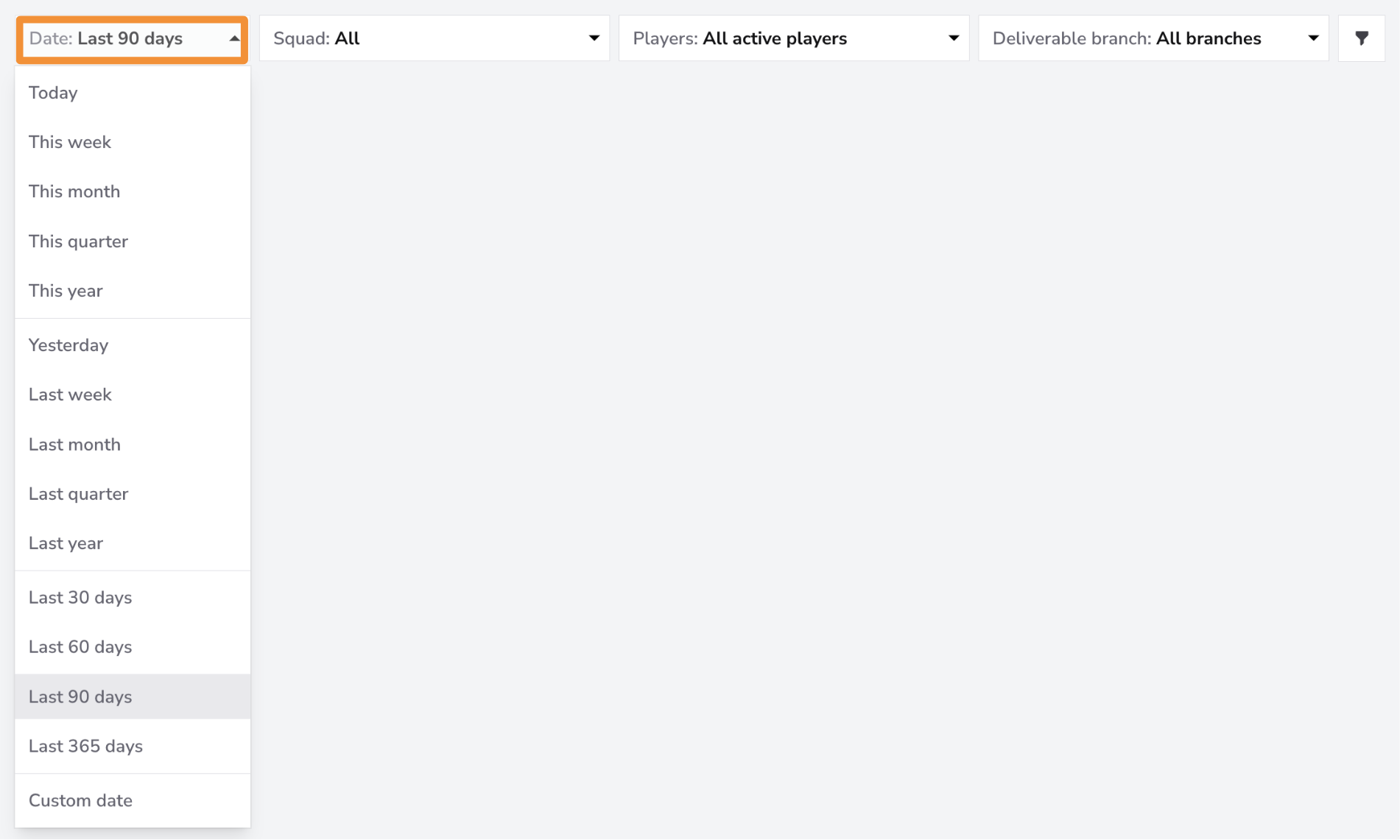
The Date Filter allows you to view data for specific time periods. You can filter for the last month, quarter, or 365 days. If you need more granular control, you can filter by a custom date range.
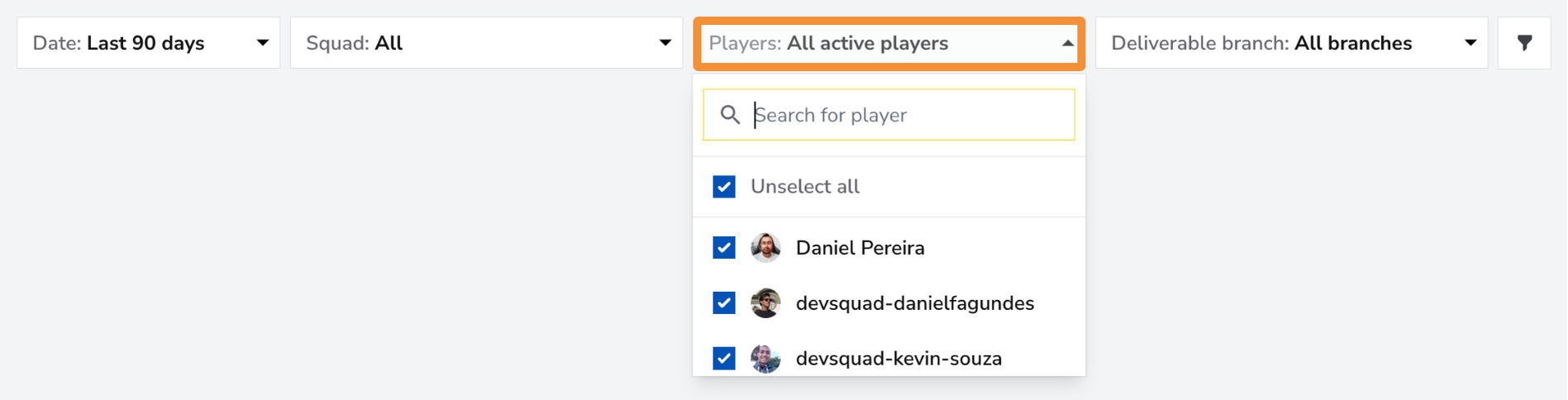
Use the Players Filter to focus on individual team members or a specific group within your squad. You can select one member for a detailed view, a group of team members if they form a sub-squad, or all team members for an overview of the entire squad's Code Review metrics.
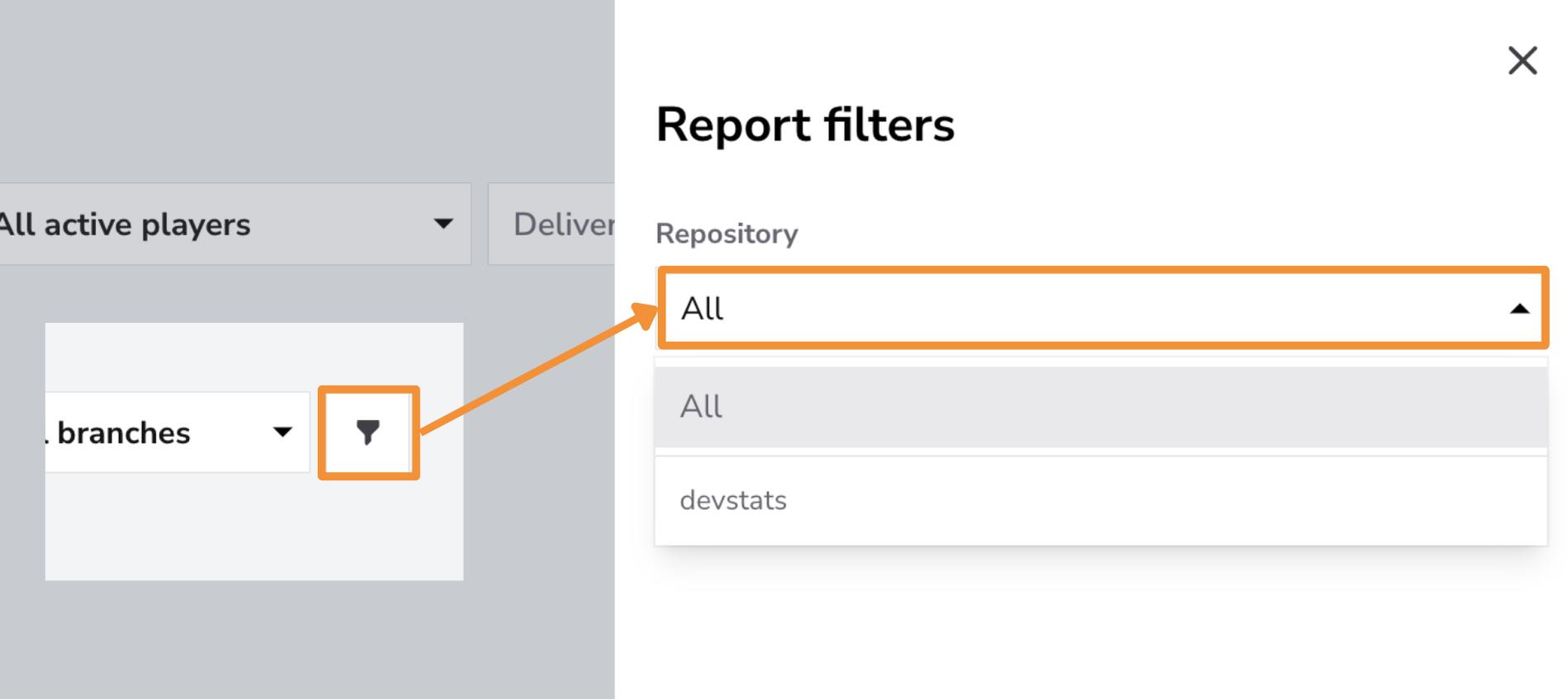
Use the Repository Filter to focus on specific repositories or view code review metrics across all repositories. This filter is especially useful for examining review practices and performance within individual codebases, particularly when working across multiple repositories. Analyzing code review activity by repository allows you to identify bottlenecks, optimize review processes, and maintain consistency in code quality across different parts of your codebase.
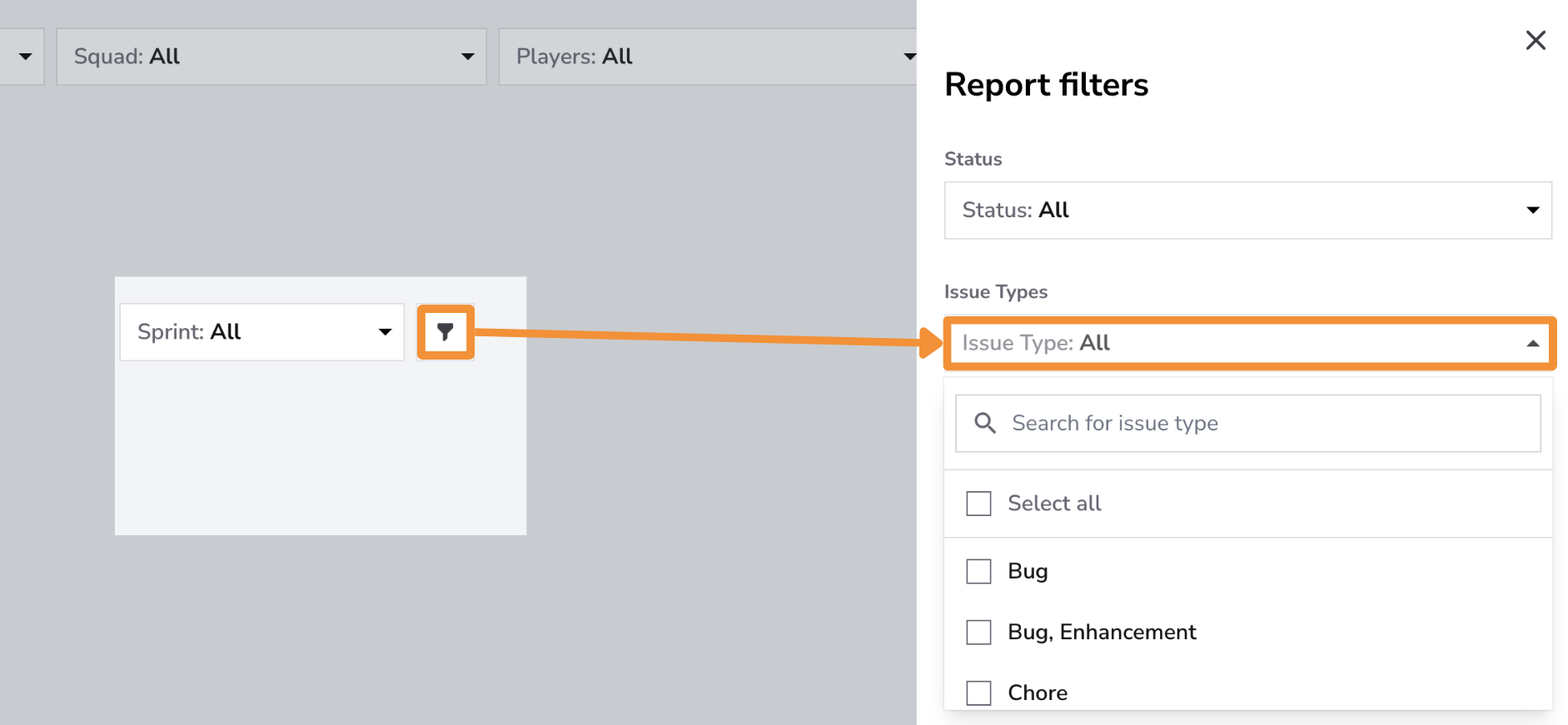
Use the Issue Type Filter to focus on specific issue types, such as Features, Bugs, Enhancements, or Hotfixes. This filter allows you to track code review activity by issue type, providing insights into the team's focus and priorities during the review process. Monitoring reviews by issue type is particularly useful for ensuring that critical items like hotfixes and bugs receive prompt attention, helping maintain code quality and product stability.
Controls
Select PR size, Review depth, or Comments per review to open Controls and choose a Statistical Measure. PR size offers Average and Percentile; Mode is not offered because PR sizes rarely repeat. Review depth and Comments per review offer Average, Mode, and Percentile. When two values tie for Mode, the result is their average. Every percentile changes the number shown on the cards and chart. These cards offer Statistical Measure only. Other cards do not show Controls; Chart Settings and PR Cycle Time Stages are not available in this report.
Click the adjustments button on the Controls bar and select Save after choosing your options. See the Controls guide for details.
Explore Best Practices
Conclusion
The Code Review feature provides valuable insights into your team’s review activity, helping improve both code quality and collaboration.
By monitoring metrics such as Reviews Completed,Comments per Review,PR Size, and Issues Caught, teams can identify patterns, refine their review practices, and maintain a consistent standard of quality across all pull requests.