The Deploy feature helps you monitor and optimize your team’s deployment process, enabling smoother, more reliable releases. Here’s a guide to making the most of this tool by leveraging key metrics, analyzing trends, and encouraging best practices in deployment.
Step 1: Monitor Deploy Frequency
- How:Use the Deploys and Deploy Frequency metrics to track how often updates are released.
- What to look for: A frequent, consistent deployment cadence typically reflects a mature development process. Aim for smaller, more frequent deployments, which reduce risks associated with large releases and allow new features and fixes to reach users faster.
Step 2: Track and Reduce Change Failure Rate
- How:Closely watch the Change Failure Rate to ensure deployment stability and quality.
- What to Look For: A high failure rate signals potential issues, such as gaps in testing or integration. Investigate root causes like inadequate testing or insufficient code reviews and address them promptly. Reducing this rate will lead to fewer production issues and increase confidence in your deployment process.
- Tip: Implement automated testing and robust review processes to catch errors early and keep the change failure rate low.
Step 3: Analyze Trends Over Time
-
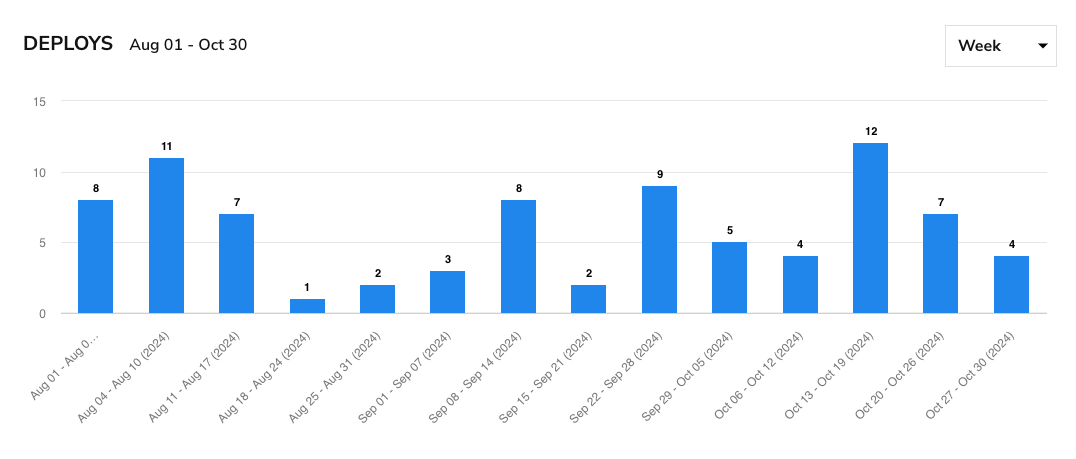
How:**Use the bar chart to view a week-by-week breakdown of deployment activity, identifying patterns or inconsistencies.
-
What to Look For: Look for spikes in activity that may align with major feature releases. Be mindful of any periods of low deployment, as this could indicate bottlenecks. Analyzing these trends helps you pinpoint areas needing process improvements, such as resource allocation or pipeline efficiency.
Conclusion
The Deploy Dashboard is a powerful tool for refining your team’s deployment process. You can ensure smoother releases and enhance delivery efficiency by consistently monitoring deployment frequency, tracking failure rates, and analyzing trends.