
![How to Set Up a Software Engineering Dashboard [+Key Metrics]](/images/blog/software-engineering-dashboard--0--67a530761be466ae6b3b6686_code-changes_8c085a35efdd2b9614557238302db1a0_2000.jpeg)
If your engineering team isn't using a software engineering dashboard, you're probably flying blind.
A solid dashboard gives you real-time data, key metrics, and clear visualizations—all in one place—so you can make smarter decisions, ship faster, and keep your team aligned. Instead of digging through Git logs, issue trackers, or spreadsheets, you get a single source of truth that helps you track progress, spot bottlenecks, and optimize workflows.
In this guide, we'll break down exactly what an effective software engineering dashboard should include, how to set one up, and how to use your dashboard to manage continuous improvement.
What your software engineering dashboard should include
1. Code quality metrics
High-quality code is the backbone of stable, maintainable software. A strong software engineering dashboard must track key metrics that highlight potential risks and areas for improvement.
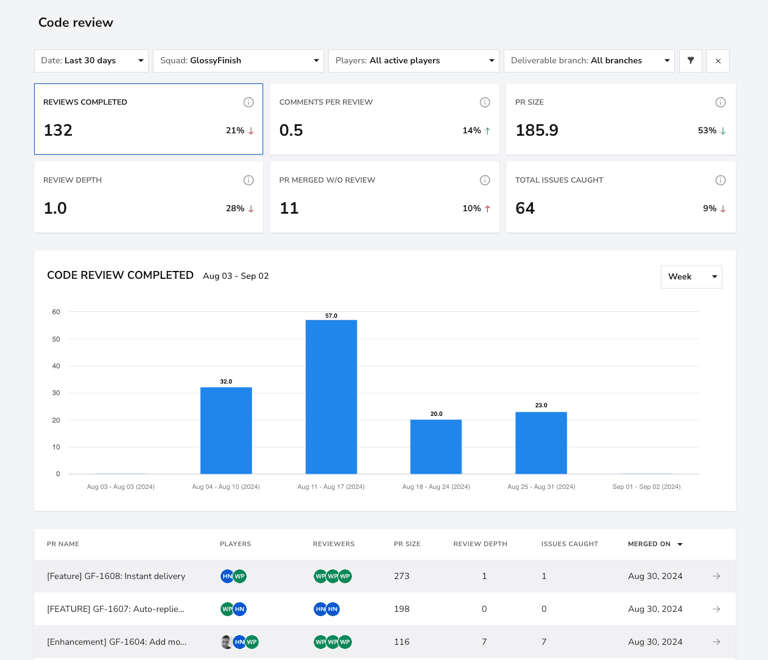
Key metrics to track:
- Change failure rate (DORA metrics): Measures how often deployments result in failures, indicating code stability.
- PRs merged without review: Identifies gaps in the review process that could lead to undetected issues.
- Issues caught in reviews: Reflects the effectiveness of peer code reviews in catching bugs early.
- Rework and refactor (work breakdown): Tracks the time spent refining existing code, ensuring maintainability.
2. Engineering velocity metrics
Engineering velocity is a critical measure of how efficiently a team delivers software. A well-structured dashboard provides insights into bottlenecks, identifies inefficiencies, and guarantees a smooth workflow across the development pipeline.
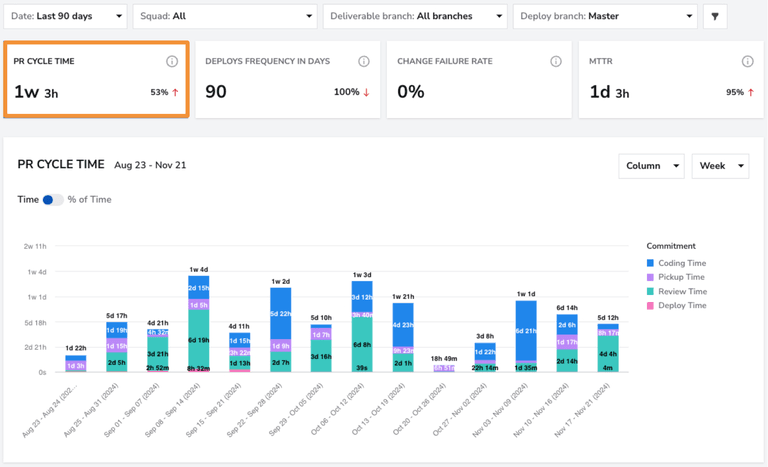
Key metrics to track:
- PR cycle time (coding, review, deployment): Tracks how long it takes for pull requests to progress from creation to deployment.
- Deploy frequency in days: Measures how often code is shipped to production, ensuring rapid iteration.
- Daily work in progress (WIP) tasks: Identifies workload distribution and potential bottlenecks in development.
- Issue cycle time per task type: Highlights delays in resolving different types of work, such as features, bugs, and enhancements.
3. Technical debt management
Technical debt is the silent killer of engineering teams. If left unchecked, it drags down velocity, increases failures, and turns simple fixes into nightmares.
Key metrics to track:
- Rework and refactoring trends: Avoid excessive fixes by addressing root causes early.
- Change failure rate: High numbers here mean unstable deployments and poor testing.
- Issue cycle time for bugs and hotfixes: Faster resolution keeps users happy and teams focused.
4. Productivity and collaboration metrics
Productivity isn't just about speed—it's about sustainable, high-quality output. A solid dashboard gives teams visibility into their workload and collaboration habits.
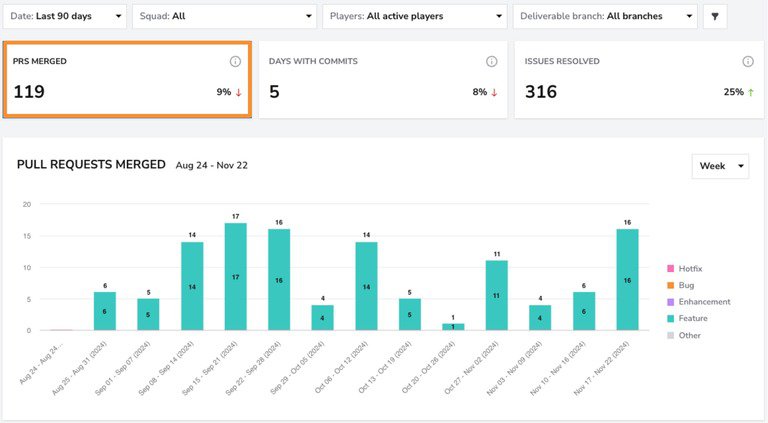
Key metrics to track:
- PRs merged vs. PRs opened (throughput): A widening gap suggests bottlenecks in the review process.
- Days with commits: Consistent commits indicate steady progress, while gaps may signal blockers.
- Comments per review: Fewer comments could mean rushed or shallow reviews, affecting code quality.
- Tracking engagement and preventing burnout: Monitor workload distribution to check that developers aren't overwhelmed.
5. Deployment and reliability metrics
Reliable deployments are the backbone of a high-performing engineering team. Frequent, stable releases mean faster feedback loops and fewer fire drills.
Key metrics to track:
- Deploy frequency: More frequent deployments lead to faster iteration and reduced risk per release.
- Change failure rate: A high failure rate signals poor testing or rushed code merges.
How to build a software engineering dashboard
Step 1: Choose an engineering analytics platform
Start by selecting a robust engineering analytics platform. A powerful tool offers seamless integration with your existing development workflow and provides accurate, real-time insights. Configure it according to your organization's needs, connect repositories, and import historical data. The more data available, the better the insights.
Step 2: Connect to data sources
Your dashboard must pull data from multiple sources to provide a comprehensive view of engineering performance. Integrate with GitHub, GitLab, or Bitbucket and make sure all repositories are linked. Use API integrations as needed for real-time data updates to eliminate manual tracking.
Step 3: Visualize your data
Now that your data sources are connected, it's time to explore your dashboard and get comfortable with the layout. A few key metrics to check right away include PR Cycle Time, Deploy Frequency, and Issue Cycle Time. As you navigate, look for trends, bottlenecks, or unexpected patterns to get a quick sense of your team's workflow.
Step 4: Identify bottlenecks and issues
A dashboard is only useful if it leads to action. Use it to detect inefficiencies, such as slow PR cycles, high change failure rates, or inconsistent deployment frequencies.
- Analyze PR cycle time to spot delays
- Monitor issue cycle time to uncover blockers in development
- Track daily WIP to prevent team overload, too much unplanned work, and context switching
Step 5: Plan realistic benchmarks
Continuous improvement starts with setting achievable, data-backed goals. Begin by comparing your current metrics against industry standards, using frameworks like DORA and SPACE as a baseline. From there, set improvement targets for key areas such as code quality, development velocity, and team collaboration.
Step 6: Execute necessary changes
Once problem areas are identified and benchmarks are set, implement changes to optimize team efficiency and code quality. Start by prioritizing the most impactful adjustments, focusing on bottlenecks that slow down development.
- Reduce PR cycle time by streamlining reviews and automating tests
- Increase deployment frequency by improving CI/CD practices
- Enhance collaboration by enforcing review processes and balancing workloads
Step 7: Review your results
An engineering dashboard should grow and adapt as your development team evolves, so it's important to regularly check in on key metrics and make adjustments as needed. Track progress against your benchmarks and see if the changes you've implemented are making a real impact. If things start to plateau, take a step back, reassess your processes, and tweak your approach. Continuous improvement is a cycle of identifying, planning, executing, and reviewing. Stay flexible, keep an eye on trends, and refine your strategy to ensure long-term success.